

Implementing AES-256-GCM Encryption at Rest in Node.js
Introduction
Modern web applications rely heavily on TLS (HTTPS) to protect data while it travels between clients and servers. However, this protection ends once the data reaches the application. If sensitive information is stored without additional protection, a database compromise can expose that data in readable form.
Application-level encryption addresses this problem by encrypting sensitive data before it is written to persistent storage. Instead of storing plaintext values, the database stores encrypted data that can only be recovered by the application with the correct encryption key.
In this article, we will explore the principles behind encryption at rest and implement a secure application-level encryption system in Node.js using the native crypto module. We will cover the cryptographic concepts involved, the rules required for secure encryption, and build reusable encryption and decryption utilities for protecting database records.
II. Understanding Encryption at Rest
Encryption at rest is the practice of protecting stored data by converting it into an unreadable format before it is written to persistent storage. This applies to databases, file systems, backups, and object storage.
Encryption at rest is different from encryption in transit. TLS protects information while it moves across a network, but it does not protect data after it has reached the application and database.
The Threat Model
A typical backend application processes data through several stages:
Client → Application
Data is transmitted securely using TLS (HTTPS).
Application Processing
The application receives and processes the plaintext data.
Database Storage
The data is stored. Without additional encryption, sensitive values remain readable.
The security gap exists at the storage layer. If an attacker gains access to the database through stolen credentials, SQL injection, exposed backups, or incorrect permissions, stored information may be immediately accessible.
TLS cannot protect data after it has already been stored.
Encryption in Transit vs. Encryption at Rest
| Feature | Encryption in Transit | Encryption at Rest |
|---|---|---|
| Purpose | Protect data while moving between systems | Protect stored data |
| Example | HTTPS/TLS | Encrypted database fields |
| Protects Against | Network interception | Database compromise and storage exposure |
| Applied By | Infrastructure and networking layers | Database or application layer |
Both forms of encryption are important. TLS protects data while it travels, while encryption at rest protects it after storage.
Choosing the Right Encryption Approach
Before implementing encryption in Node.js, it is important to understand the main categories of cryptographic algorithms and where each one should be used.
III. Symmetric vs. Asymmetric Encryption
Modern cryptography is divided into two major categories: symmetric encryption and asymmetric encryption.
Both provide security, but they solve different problems.
Symmetric Encryption
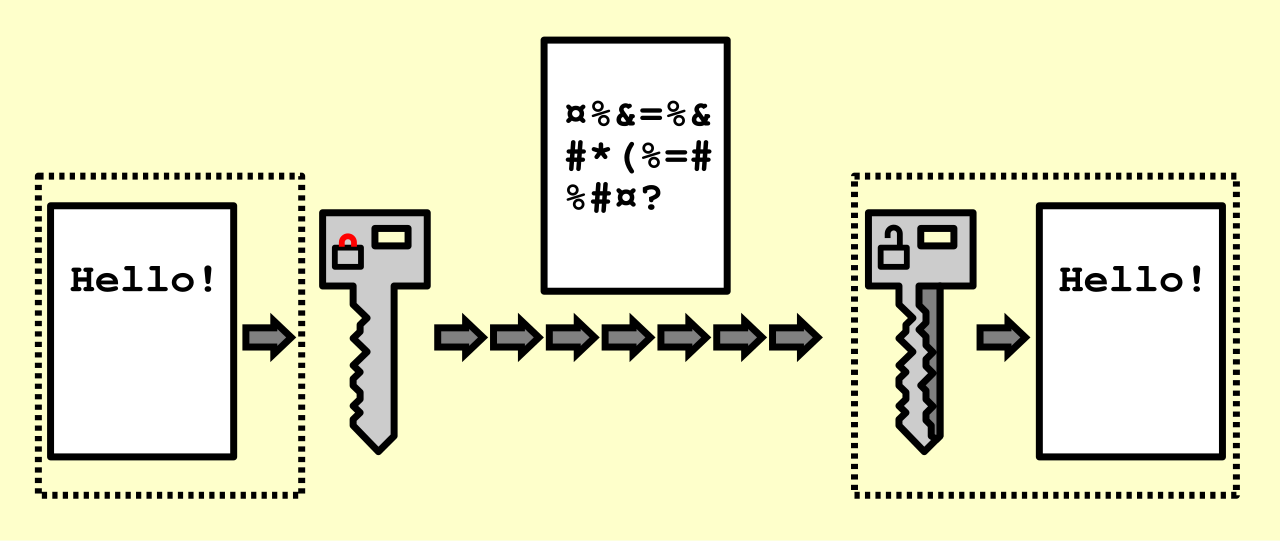
Symmetric encryption uses a single secret key for both encryption and decryption.
The same key that transforms plaintext into ciphertext is required to recover the original data.
Advantages
Very fast and efficient
Suitable for encrypting large amounts of data
Ideal for protecting stored application data
Challenge
The main difficulty is protecting the encryption key. Anyone who obtains the key can decrypt the protected data.
Common symmetric algorithms include:
AES (Advanced Encryption Standard)
ChaCha20
Asymmetric Encryption
Asymmetric encryption uses a pair of keys:
A public key that can be shared
A private key that must remain secret
Data encrypted with the public key can only be decrypted using the matching private key.
Advantages
Enables secure key exchange
Supports digital signatures
Removes the need to share a secret key publicly
Limitations
Much slower than symmetric encryption
Not suitable for encrypting large amounts of application data
Common asymmetric algorithms include:
RSA
Elliptic Curve Cryptography (ECC)
Ed25519
Which Approach Should Be Used for Database Encryption?
For encrypting database records, symmetric encryption is the appropriate choice.
A backend application typically writes and reads its own data. There is no need to exchange encryption keys with another party, making the speed and simplicity of symmetric encryption the better option.
Asymmetric encryption remains essential for other areas of security, such as authentication, digital signatures, and secure key exchange.
For protecting stored application data, we need a fast symmetric encryption algorithm with strong security guarantees.
IV. What is AES-256-GCM?
AES-256-GCM combines three cryptographic concepts:
AES (Advanced Encryption Standard): the encryption algorithm
256: the size of the encryption key
GCM (Galois/Counter Mode): the mode that provides encryption and integrity verification
Together, they provide a modern authenticated encryption system suitable for protecting sensitive application data.
AES
AES is a symmetric block cipher standardized by NIST and widely adopted across modern systems.
It supports three key sizes:
128-bit
192-bit
256-bit
AES is considered secure because it has been extensively analyzed, efficiently implemented, and widely deployed across operating systems, cloud providers, and security standards.
Why AES-256?
The "256" in AES-256 refers to the key size.
A 256-bit key provides an extremely large number of possible combinations, making brute-force attacks computationally impractical.
AES-128 is still considered secure, but AES-256 provides a larger security margin and is commonly selected when protecting highly sensitive information.
Understanding GCM
AES only defines the encryption algorithm. A mode of operation determines how AES is applied to larger amounts of data.
GCM (Galois/Counter Mode) is a modern mode that provides Authenticated Encryption with Associated Data (AEAD).
This provides two important security properties:
Confidentiality
The original data is encrypted and cannot be read without the encryption key.
Integrity
Any modification to the encrypted data is detected during decryption.
AES-GCM produces three important values:
Ciphertext
Nonce (IV)
Authentication tag
The authentication tag allows the application to verify that the encrypted data has not been modified. If the ciphertext, nonce, or key is incorrect, decryption fails instead of returning invalid data.
With the fundamentals of AES-256-GCM understood, we can now examine the rules required to use it securely.
V. The Three Critical Rules of AES-GCM
AES-256-GCM provides strong security guarantees, but only when it is implemented correctly. Most AES-GCM vulnerabilities do not come from breaking the algorithm itself, in fact, they come from incorrect usage.
Three rules are essential for maintaining the security properties of AES-GCM.
Rule 1: Never Reuse a Nonce with the Same Key
A nonce (Number Used Once), also called an initialization vector (IV), is a unique value used during encryption.
With AES-GCM, every encryption operation using the same key must use a different nonce.
The nonce is used internally by GCM to generate the encryption stream. Reusing the same nonce with the same key causes the encryption process to reuse the same internal state, which can expose information about the original plaintext and compromise the authentication mechanism.
Nonce reuse can result in:
Loss of confidentiality
Exposure of relationships between encrypted messages
Ability to forge valid authentication tags
The correct approach is to generate a fresh random nonce for every encryption operation:
const iv = crypto.randomBytes(12);

const cipher = crypto.createCipheriv(
    'aes-256-gcm',
    key,
    iv
);
AES-GCM is optimized for 96-bit (12-byte) nonces, which is the recommended size for most applications.
The nonce does not need to be secret. It must simply be unique and stored alongside the encrypted data so it can be provided during decryption.
Example storage format:
{
  "iv": "...",
  "tag": "...",
  "data": "..."
}
Rule 2: Always Verify the Authentication Tag
AES-GCM is an authenticated encryption algorithm. It does not only encrypt data: it also verifies that the encrypted data has not been modified.
During encryption, GCM generates an authentication tag.
During decryption, this tag must be provided and verified before the plaintext is returned.
In Node.js:
decipher.setAuthTag(authTag);

const plaintext = Buffer.concat([
    decipher.update(ciphertext),
    decipher.final()
]);
If the ciphertext has been modified, the wrong key is used, or the authentication tag does not match, decipher.final() throws an error.
A successful decryption should always mean:
The key is correct
The nonce is correct
The ciphertext is unchanged
The authentication tag is valid
Never ignore authentication failures or return partially decrypted data.
Rule 3: Protect Your Encryption Key
The encryption key is the most sensitive component of the entire system.
AES-256-GCM can only protect data if the key remains secret. If an attacker obtains the encryption key, they can decrypt all data protected by that key.
Common ways keys are accidentally exposed include:
Hardcoding keys in source code
Committing secrets to version control
Logging sensitive configuration values
Storing keys in insecure files
Exposing production secrets to unnecessary users
Key Management Best Practices
Never hardcode encryption keys
Encryption keys should never exist directly in application code.
Bad:
const key = "a1b2c3d4...";
Use environment variables for development
Example:
AES_256_KEY=your_secret_key_here
Ensure environment files are excluded from version control.
Use a secrets manager in production
Production systems should use dedicated secret storage solutions, such as:
AWS Secrets Manager
Azure Key Vault
Google Secret Manager
HashiCorp Vault
Restrict access
Only the services and users that require access to the encryption key should be able to retrieve it.
Plan for key rotation
A production system should have a strategy for replacing keys without losing access to existing encrypted data.
Example key loading:
const secretKeyHex = process.env.AES_256_KEY;

if (!secretKeyHex) {
    throw new Error('AES_256_KEY is missing');
}

if (secretKeyHex.length !== 64) {
    throw new Error('AES_256_KEY must contain 32 bytes');
}

const key = Buffer.from(secretKeyHex, 'hex');
Following these three rules ensures AES-256-GCM provides the security guarantees it was designed to deliver.
VI. Implementation in Node.js
Node.js includes a built-in crypto module that provides native support for AES-256-GCM.
No external dependencies are required.
Before implementing encryption, remember that AES-GCM produces three values that must be stored together:
Ciphertext: the encrypted data
Nonce (IV): required for decryption
Authentication tag: verifies data integrity
The database does not need to understand these values. It only needs to store them so the application can decrypt the data later.
Step 1: Generate an Encryption Key
AES-256 requires a 256-bit (32-byte) key.
The key must be generated using a cryptographically secure random generator.
Generate a key:
node -e "console.log(require('crypto').randomBytes(32).toString('hex'))"
Example output:
8f3a9b2c4d5e6f7a8b9c0d1e2f3a4b5c6d7e8f9a0b1c2d3e4f5a6b7c8d9e0f1
Store the key securely:
AES_256_KEY=your_generated_key_here
Never commit this value to source control.
Step 2: Create the Encryption Utility
Create a reusable encryption module:
// crypto.js

const crypto = require('crypto');

const ALGORITHM = 'aes-256-gcm';

const KEY_HEX = process.env.AES_256_KEY;

if (!KEY_HEX || KEY_HEX.length !== 64) {
    throw new Error(
        'AES_256_KEY must be a 64-character hexadecimal string'
    );
}

const KEY = Buffer.from(KEY_HEX, 'hex');


function encrypt(value) {
    if (value === null || value === undefined) {
        return null;
    }

    const plaintext = JSON.stringify(value);

    const iv = crypto.randomBytes(12);

    const cipher = crypto.createCipheriv(
        ALGORITHM,
        KEY,
        iv
    );

    const ciphertext = Buffer.concat([
        cipher.update(plaintext, 'utf8'),
        cipher.final()
    ]);

    const authTag = cipher.getAuthTag();

    return JSON.stringify({
        iv: iv.toString('hex'),
        tag: authTag.toString('hex'),
        data: ciphertext.toString('hex')
    });
}


function decrypt(payload) {
    if (!payload) {
        return null;
    }

    const {
        iv,
        tag,
        data
    } = JSON.parse(payload);


    const decipher = crypto.createDecipheriv(
        ALGORITHM,
        KEY,
        Buffer.from(iv, 'hex')
    );


    decipher.setAuthTag(
        Buffer.from(tag, 'hex')
    );


    const plaintext = Buffer.concat([
        decipher.update(Buffer.from(data, 'hex')),
        decipher.final()
    ]);


    return JSON.parse(
        plaintext.toString('utf8')
    );
}


module.exports = {
    encrypt,
    decrypt
};
How the Implementation Works
Encryption Flow
The encryption process follows these steps:
- Generate a unique nonce:
crypto.randomBytes(12)
Create an AES-256-GCM cipher using the encryption key.
Encrypt the plaintext into ciphertext.
Extract the authentication tag.
Store the nonce, tag, and ciphertext together.
Decryption Flow
The decryption process reverses the operation:
Read the stored encrypted payload.
Extract the nonce, authentication tag, and ciphertext.
Initialize AES-GCM with the same key and nonce.
Provide the authentication tag.
Decrypt the ciphertext.
If any value has been modified, authentication fails and decryption stops.
Database Storage Format
Encrypted values can be stored as a JSON string:
{
  "iv": "a1b2c3d4e5f6789012345678",
  "tag": "f9e8d7c6b5a43210fedcba9876543210",
  "data": "8a7b6c5d4e3f20112233445566778899"
}
A typical database column can simply use a text-based type:
PostgreSQL:
TEXTMySQL:
TEXTorVARCHARMongoDB:
String
One important limitation of application-level encryption is that encrypted fields cannot be queried normally. Searching, sorting, or indexing encrypted values requires additional design decisions.
VII. Conclusion
Encryption at rest is an essential part of protecting sensitive data in modern backend applications. TLS protects information while it travels between systems, but it does not protect data after it reaches the application and database.
By encrypting sensitive values before storage, applications can reduce the impact of database breaches and unauthorized access.
In this article, we explored the foundations of encryption at rest, the differences between symmetric and asymmetric encryption, and the principles behind AES-256-GCM. We then implemented a reusable encryption layer in Node.js using the native crypto module.
The implementation follows the core requirements for secure AES-GCM usage:
Using authenticated encryption
Generating a unique nonce for every encryption operation
Protecting encryption keys outside the application code
Verifying authentication tags before accepting decrypted data
However, encryption is only one layer of a complete security strategy. Secure systems also require proper access controls, auditing, monitoring, and a clear approach to handling potential compromises.
The goal of encryption is not simply to make data unreadable. It is to ensure that sensitive information remains protected even when other security layers fail.
Building encryption into your architecture from the beginning creates systems that are more resilient, trustworthy, and prepared for real-world threats.